In Kafka you choose a number of partitions and hash keys onto them, so a slow customer holds up every customer that shares its partition. Here a partition is one entity: a customer, an order, a conversation. The push that names it creates it, order holds inside it, and one queue has held ten million.
The transactionId makes a retry safe: the same id within the dedup window (an hour by default) is not written twice.
await queen.queue('orders')
  .partition('customer-42')       // one ordered partition per customer, created by this push
  .push([{
    transactionId: 'order-1001',  // the dedup key: pushing the same id again is a no-op
    data: { orderId: 1001, customer: 42, total: 59.9 },
  }])
await (
queen.queue("orders")
.partition("customer-42") # one ordered partition per customer, created by this push
.push([{
"transactionId": "order-1001", # the dedup key: pushing the same id again is a no-op
"data": {"orderId": 1001, "customer": 42, "total": 59.9},
}])
)_, err = client.Queue("orders").
Partition("customer-42"). // one ordered partition per customer, created by this push
Push(map[string]interface{}{"orderId": 1001, "customer": 42, "total": 59.9}).
TransactionID("order-1001"). // the dedup key: pushing the same id again is a no-op
Execute(ctx)
if err != nil {
log.Fatal(err)
}use queen_mq::PushItem;
queen
.queue("orders")
.push_items(vec![PushItem::new("orders", json!({ "orderId": 1001, "customer": 42, "total": 59.9 }))
.partition("customer-42") // one ordered partition per customer, created by this push
.transaction_id("order-1001")]) // the dedup key: pushing the same id again is a no-op
.await?;$queen->queue('orders')
->partition('customer-42') // one ordered partition per customer, created by this push
->push([[
'transactionId' => 'order-1001', // the dedup key: pushing the same id again is a no-op
'data' => ['orderId' => 1001, 'customer' => 42, 'total' => 59.9],
]])
->execute();client.queue("orders")
.partition("customer-42") // one ordered partition per customer, created by the push
.push({{
{"transactionId", "order-1001"}, // the dedup key: pushing it again is a no-op
{"data", {{"orderId", 1001}, {"customer", 42}, {"total", 59.9}}},
}});Default.Every message gets its own answer
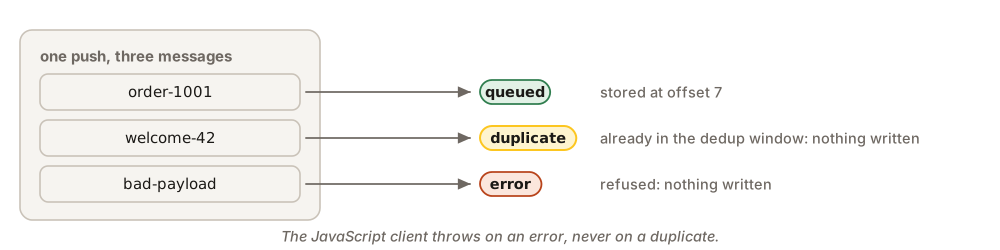
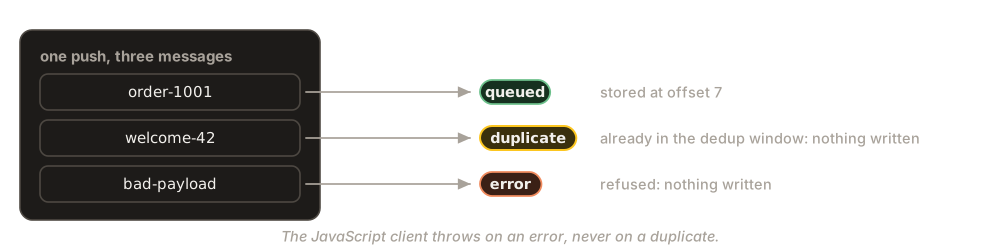
One push can carry many messages, and the broker answers each one: queued (stored, with its offset), duplicate (that transactionId is already there, nothing was written) or error (refused, nothing written). The JavaScript client throws when any message is refused, unless you handle it yourself, and never throws for a duplicate. The other clients never throw for a refused message: they return each message’s status, and their code below reads it.
await queen.queue('emails')
  .partition('customer-42')
  .push([{ transactionId: 'welcome-42', data: { to: 'ada@example.com' } }])
  .onSuccess((items) => console.log('stored', items.length))
  .onDuplicate((items) => console.log('already stored', items[0].transactionId))
  .onError((items, error) => console.error('refused', error.message))
async def stored(items):
print("stored", len(items))
async def already_stored(items, error):
print("already stored", items[0]["transactionId"])
async def refused(items, error):
print("refused", error)
await (
queen.queue("emails")
.partition("customer-42")
.push([{"transactionId": "welcome-42", "data": {"to": "ada@example.com"}}])
.on_success(stored)
.on_duplicate(already_stored)
.on_error(refused)
)results, err := client.Queue("emails").
Partition("customer-42").
Push(map[string]interface{}{"to": "ada@example.com"}).
TransactionID("welcome-42").
Execute(ctx)
if err != nil {
log.Fatal(err) // the request failed: no message got an answer
}
for _, r := range results { // one answer per message; a refusal is not an error here
switch r.Status {
case "queued":
fmt.Println("stored", r.TransactionID)
case "duplicate":
fmt.Println("already stored", r.TransactionID)
default:
fmt.Println("refused", r.Error)
}
}use queen_mq::PushStatus;
let results = queen
.queue("emails")
.push_items(vec![PushItem::new("emails", json!({ "to": "ada@example.com" }))
.partition("customer-42")
.transaction_id("welcome-42")])
.await?; // an Err only when the whole request failed
for item in &results {
// every message gets its own answer
match item.status {
PushStatus::Queued => println!("stored {}", item.transaction_id),
PushStatus::Duplicate => println!("already stored {}", item.transaction_id),
_ => eprintln!("refused {}", item.transaction_id),
}
}$answers = $queen->queue('emails')
->partition('customer-42')
->push([['transactionId' => 'welcome-42', 'data' => ['to' => 'ada@example.com']]])
->onSuccess(fn ($items) => printf("stored %d\n", count($items)))
->onDuplicate(fn ($items) => printf("already stored %s\n", $items[0]['transactionId']))
->onError(fn ($items, $error) => error_log("refused {$error->getMessage()}"))
->execute();
// In PHP an item the broker refuses alone reaches no callback: read its status.
foreach ((array) $answers as $answer) {
if (($answer['status'] ?? null) === 'error') {
error_log("refused {$answer['transaction_id']}");
}
}json answers = client.queue("emails")
.partition("customer-42")
.push({{{"transactionId", "welcome-42"}, {"data", {{"to", "ada@example.com"}}}}});
for (const json& answer : answers) { // one answer per message, in order
const std::string status = answer["status"];
if (status == "queued") {
std::cout << "stored at offset " << answer["offset"] << "\n";
} else if (status == "duplicate") {
std::cout << "already stored " << answer["transaction_id"] << "\n";
} else { // "error": refused, nothing written
std::cerr << "refused message " << answer["index"] << "\n";
}
}Buffering, for many small messages
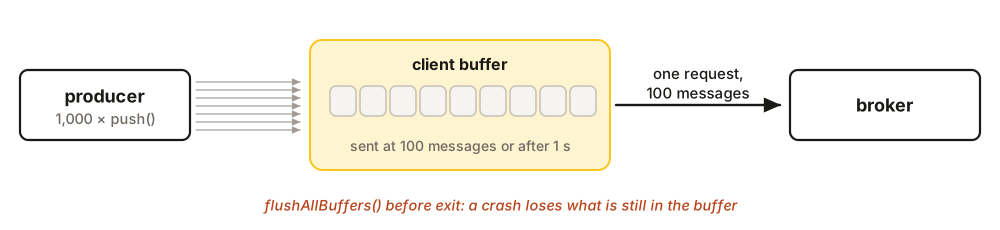
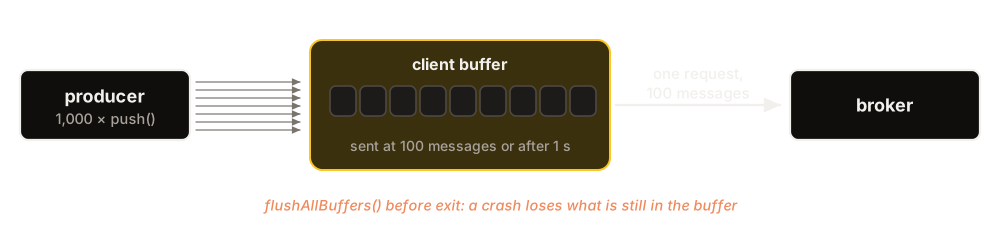
Each push is one HTTP request. A producer that pushes thousands of small messages a second can let the client collect them and send them in batches instead.
for (let i = 0; i < 1000; i++) {
  await queen.queue('events')
    .partition(`device-${i % 10}`)
    .buffer({ messageCount: 100, timeMillis: 1000 })  // 100 at a time, or every second
    .push([{ transactionId: `reading-${i}`, data: { device: i % 10, value: i } }])
}
await queen.flushAllBuffers()                         // before exiting, send what is left
for i in range(1000):
await (
queen.queue("events")
.partition(f"device-{i % 10}")
.buffer({"message_count": 100, "time_millis": 1000}) # 100 at once, or every second
.push([{"transactionId": f"reading-{i}", "data": {"device": i % 10, "value": i}}])
)
await queen.flush_all_buffers() # before exiting, send what is leftfor i := 0; i < 1000; i++ {
_, err := client.Queue("events").
Partition(fmt.Sprintf("device-%d", i%10)).
Buffer(queen.BufferConfig{
MessageCount: 100, // 100 at a time,
TimeMillis: 1000, // or every second
}).
Push(map[string]interface{}{"device": i % 10, "value": i}).
TransactionID(fmt.Sprintf("reading-%d", i)).
Execute(ctx)
if err != nil {
log.Fatal(err)
}
}
if err := client.FlushAllBuffers(ctx); err != nil { // before exiting, send what is left
log.Fatal(err)
}use queen_mq::BufferOptions;
let buffer = BufferOptions {
message_count: 100, // 100 at a time,
time: Duration::from_millis(1000), // or every second
..Default::default()
};
for i in 0..1000 {
let device = format!("device-{}", i % 10);
let reading = PushItem::new("events", json!({ "device": i % 10, "value": i }))
.partition(&device)
.transaction_id(format!("reading-{i}"));
queen
.queue("events")
.partition(&device) // one buffer per partition
.buffer(buffer)
.push_items(vec![reading])
.await?;
}
queen.flush_all_buffers().await?; // before exiting, send what is leftfor ($i = 0; $i < 1000; $i++) {
$queen->queue('events')
->partition('device-' . ($i % 10))
->buffer([
'messageCount' => 100, // 100 at a time,
'timeMillis' => 1000, // or every second (checked at the next push)
])
->push([[
'transactionId' => "reading-{$i}",
'data' => ['device' => $i % 10, 'value' => $i],
]])
->execute();
}
$queen->flushAllBuffers(); // before exiting, send what is leftqueen::BufferOptions batches;
batches.message_count = 100; // 100 at a time,
batches.time_millis = 1000; // or every second
for (int i = 0; i < 1000; i++) {
client.queue("events")
.partition("device-" + std::to_string(i % 10))
.buffer(batches)
.push({{{"transactionId", "reading-" + std::to_string(i)},
{"data", {{"device", i % 10}, {"value", i}}}}});
}
client.flush_all_buffers(); // before exiting, send what is leftA buffer is sent when it holds messageCount messages or when timeMillis has passed, whichever comes first. If the producer gets far ahead of the network (four times messageCount waiting), a buffered push waits instead of letting memory grow.
flushAllBuffers() before you exit, and do not buffer messages you cannot afford to lose.When several messages must land together
A push of several messages is not all-or-nothing: each message gets its own answer, so some can be stored while others are refused. When messages must be stored together or not at all (an order and its payment request, say), push them in a transaction (see Advanced transactional usage).
Binary push, compression and framed pop
By default the client and the broker speak JSON. Three options of the client change how messages travel, and nothing else: the calls, their results, deduplication and the guarantees stay the same.
| Option | Default | What it does |
|---|---|---|
binaryPush |
false | A push, direct or buffered, goes as one binary body instead of a JSON document. A transaction that pushes sends its pushes the same way. |
pushCompression |
false | Needs binaryPush. The client packs each partition’s batch the way the broker stores it, and compresses it with zstd once. The broker keeps those bytes as they are. |
framedPop |
false | pop() and consume() get the records as they are stored, and the client unpacks them into the same messages. |
Turn them on when you create the client:
const fast = new Queen({
  url: 'http://localhost:6632',
  binaryPush: true,       // a push travels as one binary body, not JSON
  pushCompression: true,  // with binaryPush: each partition's batch is zstd-compressed here
  framedPop: true,        // a pop gets the records as stored, and unpacks them here
})

await fast.queue('invoices').partition('customer-42')
  .push([{ transactionId: 'invoice-2001', data: { orderId: 2001, total: 12.5 } }])

await fast.queue('invoices').each().limit(1).consume(async (msg) => {
  console.log(msg.data)           // { orderId: 2001, total: 12.5 }, as with JSON
})
fast = Queen(
url="http://localhost:6632",
binary_push=True, # a push travels as one binary body, not JSON
push_compression=True, # with binary_push: zstd-compresses each partition's batch here
framed_pop=True, # a pop gets the records as stored, and unpacks them here
)
await fast.queue("invoices").partition("customer-42").push(
[{"transactionId": "invoice-2001", "data": {"orderId": 2001, "total": 12.5}}]
)
async def show(msg):
print(msg["data"]) # {'orderId': 2001, 'total': 12.5}, as with JSON
await fast.queue("invoices").each().limit(1).consume(show)fast, err := queen.New(queen.ClientConfig{
URL: "http://localhost:6632",
BinaryPush: true, // a push travels as one binary body, not JSON
PushCompression: true, // with BinaryPush: a partition's batch is zstd-compressed here
FramedPop: true, // a pop gets the records as stored, and unpacks them here
})
if err != nil {
log.Fatal(err)
}
_, err = fast.Queue("invoices").Partition("customer-42").
Push(map[string]interface{}{"orderId": 2001, "total": 12.5}).
TransactionID("invoice-2001").
Execute(ctx)
if err != nil {
log.Fatal(err)
}
err = fast.Queue("invoices").Each().Limit(1).
Consume(ctx, func(ctx context.Context, msg *queen.Message) error {
fmt.Println(msg.Data) // map[orderId:2001 total:12.5], as with JSON
return nil
}).
Execute(ctx)
if err != nil {
log.Fatal(err)
}let fast = Queen::connect(
Config::new("http://localhost:6632")
.binary_push(true) // a push travels as one binary body, not JSON
.push_compression(true) // needs binary_push: zstd-compresses each partition's batch
.framed_pop(true), // a pop gets the records as stored, and unpacks them here
)?;
fast.queue("invoices")
.push_items(vec![PushItem::new("invoices", json!({ "orderId": 2001, "total": 12.5 }))
.partition("customer-42")
.transaction_id("invoice-2001")])
.await?;
fast.queue("invoices")
.limit(1)
.consume(|msg: Message| async move {
println!("{}", msg.data); // {"orderId":2001,"total":12.5}, as with JSON
Ok::<_, queen_mq::Error>(())
})
.await?;$fast = new Queen([
'url' => 'http://localhost:6632',
'binaryPush' => true, // a push travels as one binary body, not JSON
'pushCompression' => true, // with binaryPush: each partition's batch is
// zstd-compressed here (needs ext-zstd)
'framedPop' => true, // a pop gets the records as stored, and unpacks them here
]);
$fast->queue('invoices')->partition('customer-42')->push([
['transactionId' => 'invoice-2001', 'data' => ['orderId' => 2001, 'total' => 12.5]],
])->execute();
$fast->queue('invoices')->each()->limit(1)->consume(function (array $msg) {
print_r($msg['data']); // [orderId => 2001, total => 12.5], as with JSON
})->execute();queen::ClientConfig config;
config.binary_push = true; // a push travels as one binary body, not JSON
config.push_compression = true; // with binary_push: each partition's batch is
// zstd-compressed here
config.framed_pop = true; // a pop gets the stored records, and unpacks them here
queen::QueenClient fast({"http://localhost:6632"}, config);
fast.queue("invoices").partition("customer-42")
.push({{{"transactionId", "invoice-2001"},
{"data", {{"orderId", 2001}, {"total", 12.5}}}}});
fast.queue("invoices").each().limit(1).consume([&](const json& msg) {
std::cout << msg["data"] << "\n"; // {"orderId":2001,"total":12.5}, as with JSON
});Compression needs zstd in the client:
| Language | zstd |
|---|---|
| JavaScript | Comes with Node.js. |
| Python | Comes with Python 3.14; before it, pip install "queen-mq[zstd]". |
| Go | Comes with the module. |
| Rust | Comes with the crate. |
| PHP | The zstd extension: pecl install zstd. |
| C++ | Compile with -DQUEEN_CLIENT_ZSTD and link -lzstd. |
Some requests stay JSON by themselves: a push with a traceId, a pop of a conflating group, and a pop of an encrypted queue. Acks, KV, timers and locks do not change.
One trap: binaryPush and pushCompression need broker 2.3.0 or later on every node. An older broker answers 400, and the client does not fall back to JSON, so turn them on after the last node is upgraded. framedPop is safe with any broker: an older one ignores it and answers JSON.
See also
- Queues: the dedup window and the other options a push meets.
- Transactions: pushes that commit with an ack and state.
- Limits: message sizes and how many messages one push takes.