Upgrade one node at a time
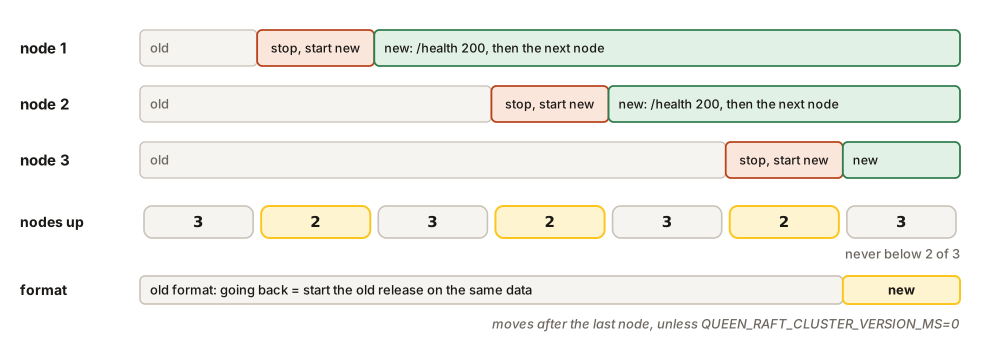
Stop one node, start the new release on the same data, and wait until its /health answers 200 before you touch the next. Healthy means the node knows the leader and has caught up (it is less than 1,000 entries or two seconds behind), so it is back in the majority before the next one stops.
In the Compose cluster, put the new version in .env and let --wait hold each step until the node is healthy:
echo "QUEEN_VERSION=<new-version>" >> .env
for n in 1 2 3; do docker compose up -d --wait queen-$n; done
We rolled three nodes from 2.5.0 to 2.6.0 this way in 18 seconds. Every message pushed before the roll was there after it, and pushing one of them again was answered duplicate: the deduplication memory survived too.
On your own machines, do the same by hand, one machine at a time:
docker stop -t 60 queen && docker rm queen
# the same docker run as before, with the new version at the end, then:
until curl -sf -o /dev/null http://10.0.0.11:6632/health; do sleep 1; done
On Kubernetes, change the image. The StatefulSet replaces one pod at a time, highest number first, and waits for each to be Ready. The operator does the same, and restarts the leader last, so the leadership moves only once:
kubectl -n queen set image statefulset/queen queen=ghcr.io/queen-mq/queen:<new-version>
kubectl -n queen patch queencluster queen --type merge \
  -p '{"spec":{"version":"<new-version>"}}'
(The first line is for the manifest, the second for the operator.) A single node has no one to take over: its upgrade is a stop and a start, a few seconds without service. Give the stop 60 seconds, because pops that are waiting for messages may take up to 30 seconds to finish.
The way back
A release can change how data is written. It does so only when every node runs it: until the last node is upgraded, the cluster keeps writing the old format, and the new feature stays off. The format is the clusterVersion in /health. While it has not moved, you can go back by starting the old release on the same data. Once it moves, an older release refuses to start on that data.
To keep the way back open while a new release proves itself, set QUEEN_RAFT_CLUSTER_VERSION_MS=0 on every node: the version then never moves. Remove the setting when you decide to stay, and the version moves within a second. 2.5.0 and 2.6.0 write the same format (version 7).
What to watch
Every node serves three things on port 6632: the dashboard at /, its health at /health, and its metrics at /metrics/prometheus. Each one describes the node that answered, so probe and scrape every node at its own address, never through a load balancer.
The dashboard. Its System page shows the replicated log and every node, with its role, its term, how far it has applied the log and how much disk it uses. A bar at the top of every page says when a node refuses writes because its disk is full.
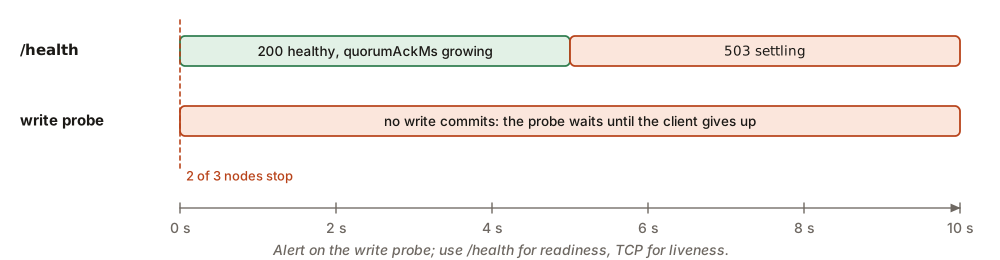
/health. It answers 200 healthy when the node knows a leader, is less than two seconds behind, and the leader has heard from a majority in the last five seconds. Otherwise it answers 503 settling.
curl -s http://10.0.0.13:6632/health
{"status":"healthy","engine":"raft","version":"2.6.0",
 "raft":{"role":"leader","leader":true,"term":1,"applied":5,"commit":5,"lag":0,
  "quorumAckMs":8,"storageReady":true,"clusterVersion":7,"kinds":7,
"apply":{"failure":null,"skipped":[]}}}| Field | Healthy | What it means |
|---|---|---|
role |
leader, follower, learner (joining, not voting yet), candidate or stopped. |
|
applied, commit |
equal | How far this node has applied the log, and how far the cluster has committed it. |
lag |
0 | Milliseconds this node is behind the leader. |
quorumAckMs |
small | Milliseconds since the leader last heard from a majority. It grows when the majority is lost. |
apply.failure |
null | The entry that stopped this node, if one did (see Recovery). |
clusterVersion, kinds |
The format the cluster writes, and the newest this build can read. |
Use /health for readiness. Use a plain TCP check on port 6632 for liveness, never /health: a 503 during an election is no reason to restart a node.
A write probe. /health reports what a node knows. It writes nothing, so it cannot prove that the cluster commits. Three seconds after we stopped two nodes of three, the third still answered 200, though no write could commit any more. So, beside /health, write a small KV key through every node every minute, and alert when it fails or takes more than a few seconds:
curl -s -m 10 -X PUT http://10.0.0.11:6632/api/v1/kv/ops/probe \
  -H 'content-type: application/json' -d '{"value":"probe","ttlSeconds":60}'
{"applied":true,"index":0,"key":"probe","op":"put","value":"probe","version":1}
On a healthy cluster it answers in a few tens of milliseconds. The key expires after a minute, so the probe leaves nothing behind.
Metrics. These are the series worth an alert:
| Series | Alert when | What it means |
|---|---|---|
queen_raft_storage_full |
= 1 | The disk is 85% full: writes that grow it answer 507. |
queen_raft_index |
committed $-$ applied keeps growing | The node applies the log slower than the cluster commits it. |
queen_raft_admit_total |
refused rises |
Writes are refused because the node is overloaded (429). |
queen_dlq_depth_by_queue |
rises | Messages are piling up in a dead-letter queue. |
queen_queue_pop_lag_milliseconds |
high | Consumers are behind. |
queen_uptime_seconds |
< 300 | The node restarted. |
For memory, compare the process’s own memory with its limit (container_memory_rss on Kubernetes). The resident size also counts files the kernel keeps in its cache and drops before it runs out of memory.
Log lines. A few lines deserve an alert of their own:
| Line | Level | What it means |
|---|---|---|
FATAL: ... |
ERROR | The node will not start. The line says why. |
APPLY FAILED at entry N |
ERROR | An entry stopped this node (see Recovery). |
raft storage pressure changed full=true |
WARN | The disk gate closed. |
refused this node's QUEEN_RAFT_TOKEN |
WARN | The nodes do not share one token. |
the process exits to load a received snapshot |
ERROR | Exit code 75. Normal once; trouble if it repeats. |