Every setting is an environment variable, and most installations need very few of them. When a node starts, it prints the settings it is really using, in lines that start with config:. Read them after every change. A yes/no setting accepts true or false, 1 or 0, yes or no, on or off; any other value stops the node at boot, so a typo cannot pass unnoticed.
| You need | What to set |
|---|---|
| To try Queen, or to develop | Nothing |
| A small production | One node with a volume, and backups |
| To survive the loss of a machine | Three nodes; five to survive two |
| To keep strangers out | Broker JWT, or the built-in proxy |
| Many teams or customers on one cluster | The proxy, and raft groups |
| Payloads that must not sit on disk in clear | QUEEN_ENCRYPTION_KEY |
| Disk that does not fill up | Retention on the queues |
| Many short-lived partitions | PARTITION_CLEANUP_SECONDS and two more |
| Kafka clients | QUEEN_KAFKA_EMBEDDED |
| Thousands of queues | QUEEN_QLOG_SHARDS, before the first start |
| To survive the loss of a whole site | A standby cluster |
To try Queen, or to develop
One command, no settings:
docker run -p 6632:6632 ghcr.io/queen-mq/queen:2.6.0Without a volume, the data lives inside the container and is gone when the container is removed. That is usually what you want on a laptop.
A small production
One node with its data on a volume:
docker run -d --name queen --restart unless-stopped --stop-timeout 60 \
  -p 6632:6632 -v /var/lib/queen:/var/lib/queen/raft \
  ghcr.io/queen-mq/queen:2.6.0
A single node writes every message to disk (fsync) before it answers. A crash, a kill -9 or a power cut loses nothing it acknowledged: it starts again and reads its log. What it cannot survive is losing its disk, so take backups (see Recovery). An upgrade stops it for a few seconds, and its ephemeral queues, which live in memory, are empty after every restart. Port 6632 stays on a private network, as on a cluster (see To keep strangers out).
To survive the loss of a machine
Run three nodes, or five (see Run a cluster with Docker). A majority of three is two, so three nodes survive one failure. Five survive two, but every write then waits for three disks, and the leader feeds four followers. Four nodes survive only one failure, like three, while every write waits for three of them: an even number only costs. Put each node on its own machine, and in its own zone if you have zones.
To keep strangers out
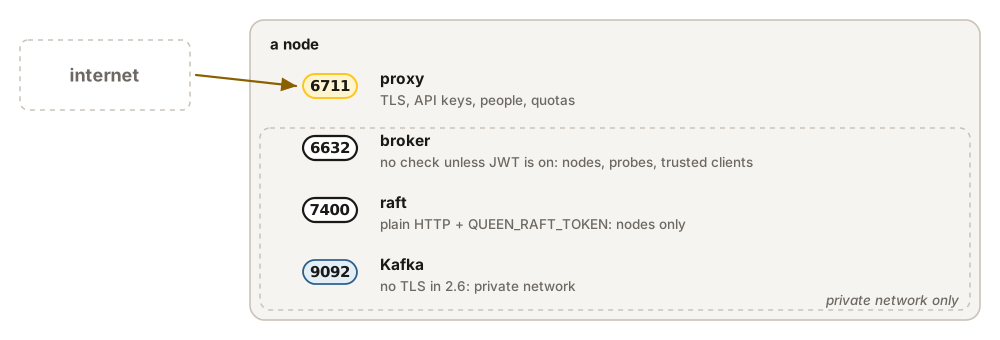
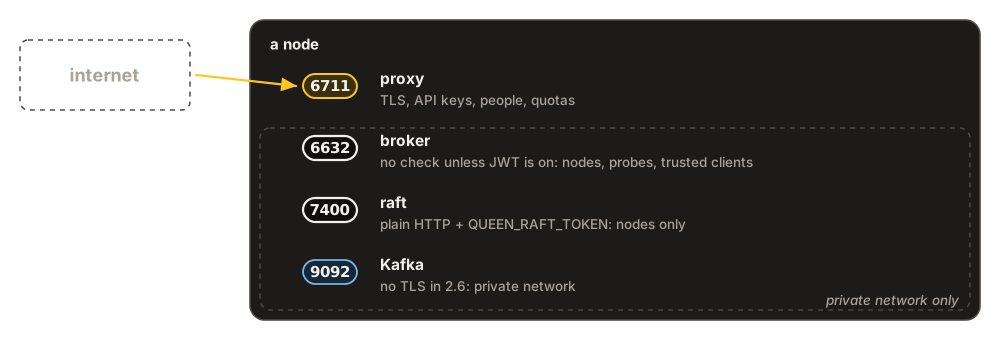
Out of the box a node checks nobody: anyone who reaches port 6632 can read, write, delete queues and change the cluster’s members. Choose one of two front doors.
| Setting | Default | What it does |
|---|---|---|
JWT_ENABLED |
false | The broker checks a token on every request. For services that already get tokens from an identity provider. |
JWT_ALGORITHM |
HS256 | HS256 checks with JWT_SECRET; RS256 and EdDSA with JWT_PUBLIC_KEY or JWT_JWKS_URL. |
QUEEN_PROXY_EMBEDDED |
false | The built-in proxy: API keys, people who sign in to the dashboard, tenants, quotas. |
QUEEN_PROXY_PORT |
unset | The proxy’s own port. Expose this one, and keep 6632 inside. |
QUEEN_TLS_CERT, _KEY |
unset | TLS on the proxy’s port. The broker port has no TLS: use your load balancer. |
A token’s roles decide what it may do: read-only, write-only (push, for producers that must not read), read-write and admin (the membership API and deletes). Whatever you choose, keep the raft port (7400) on a private network, with QUEEN_RAFT_TOKEN set on every node.
Many tenants on one cluster
One cluster can serve many teams or customers. Each one is a tenant: its queues, KV and timers are invisible to the others. The proxy built into the broker adds API keys and people in front of it. It keeps its own data (tenants, users, key hashes, plans, usage) in the broker’s replicated KV, so there is no database to run.
SESSION_SECRET=$(openssl rand -hex 32)    # signs console sessions
CP_TOKEN=$(openssl rand -hex 32)          # opens the control plane, /api/cp/*
QUEEN_KEY="qk_live_$(openssl rand -base64 32 | tr '+/' '-_' | tr -d '=')"

docker run -d --name queen -p 6711:6711 -p 127.0.0.1:6632:6632 \
  -v /var/lib/queen:/var/lib/queen/raft \
  -e QUEEN_PROXY_EMBEDDED=true \
  -e QUEEN_PROXY_PORT=6711 \
  -e QUEEN_PROXY_JWT_SECRET="$SESSION_SECRET" \
  -e QUEEN_PROXY_CP_TOKEN="$CP_TOKEN" \
  -e QUEEN_PROXY_SPOOL_DIR=/var/lib/queen/raft/proxy-spool \
  -e QUEEN_PROXY_BOOTSTRAP_TENANT=acme \
  -e QUEEN_PROXY_BOOTSTRAP_API_KEY="$QUEEN_KEY" \
  -e QUEEN_PROXY_DEFAULT_CLUSTER=acme \
  ghcr.io/queen-mq/queen:2.6.0
The first start creates the tenant acme and its key. Clients now use port 6711, with the key (bearerToken in the JavaScript client); without it they get 401 unauthorized. Port 6632 is the broker itself, with no keys: the nodes talk to each other on it, so it stays inside your network.
Add a tenant with one call to the control plane. You make the key yourself and send only its hash, so the proxy never sees the key:
KEY="qk_live_$(openssl rand -base64 32 | tr '+/' '-_' | tr -d '=')"
HASH=$(printf %s "$KEY" | sha256sum | cut -d' ' -f1)
curl -s -X POST localhost:6711/api/cp/provision -H "x-queen-cp-token: $CP_TOKEN" \
  -H 'content-type: application/json' -d '{
    "tenant_slug": "globex", "cluster_slug": "globex", "plan": "pro",
    "user_id": "308d3f3d-2306-41de-95f1-e32b12ec7470", "email": "ops@globex.example",
    "role": "admin", "key_name": "default", "key_hash": "'"$HASH"'",
    "scopes": ["produce", "consume", "read"]}'
{"broker_tenant_uuid":"91a5d7bb-879c-4ae2-95e2-295fa2704098","created":{"cluster":true,...}}
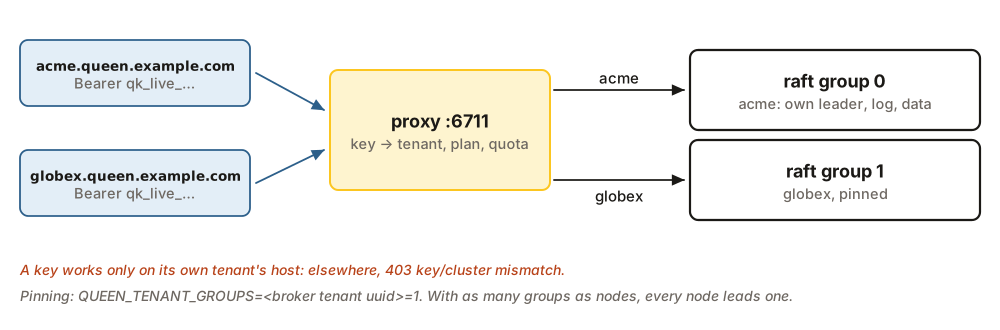
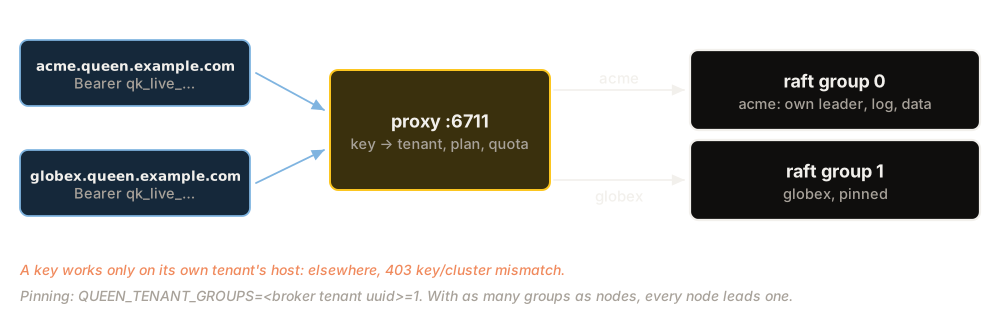
The proxy finds the tenant from the first part of the host name: globex.queen.example.com is globex. A key works only there: on another tenant’s host it gets 403 key/cluster mismatch. Each plan (free, dev, pro, dedicated-s) limits requests a second, queues and stored bytes. The proxy starts by only logging what it would block; QUEEN_PROXY_ENFORCE=true makes it block.
With one raft group, all tenants share one leader. QUEEN_RAFT_GROUPS=3 runs three groups in each node, each with its own leader, log and directory (groups/g1/, …). A tenant lives in one group, chosen by a hash of its id. To choose yourself, pin it by the broker_tenant_uuid of the answer above: QUEEN_TENANT_GROUPS=<uuid>=1 puts it in group 1. Pin a big tenant before it writes, because a tenant cannot move while it has data. With as many groups as nodes, every node leads one group.
Three things to know: every node needs the same secrets; the membership routes are closed on the proxy’s port, so call them on 6632; and keep QUEEN_PROXY_SPOOL_DIR on the data volume, where usage waits when it cannot be written.
Payloads that must not sit on disk in clear
Give every node the same key, 64 hex characters, then turn encryption on for the queues that need it (encryptionEnabled, see Create and configure queues):
QUEEN_ENCRYPTION_KEY="$(openssl rand -hex 32)" # the same value on every nodePayloads are encrypted with AES-256-GCM. Queue and partition names, KV keys and KV values are not. Check that the boot log says encryption service initialized (AES-256-GCM). Without a key, the node stores those queues in clear and says so only in its config: lines; a key of the wrong length logs one warning and does the same.
Disk that does not fill up
Queen keeps every message until retention removes it, even after every group has acked it (see Create and configure queues). Turn retention on for the queues that grow. As a last guard, a node whose disk is 85% full (QUEEN_RAFT_DISK_HIGH_PCT) refuses the writes that would grow it, with 507 storage_full, and accepts them again below 80% (QUEEN_RAFT_DISK_LOW_PCT). Reads, acks and deletes keep working.
Many short-lived partitions
Some workloads open a partition per trace, per session or per order, and never write to it again. By default an empty partition stays for 30 days, and each one costs memory and time in every retention round. To delete them soon after their last message, set three things on the broker:
docker run -d --name queen -p 6632:6632 -v /var/lib/queen:/var/lib/queen/raft \
  -e PARTITION_CLEANUP_SECONDS=60 \
  -e QUEEN_RAFT_TXN_WINDOW_MIN_S=60 \
  -e QUEEN_RAFT_RETENTION_SCAN_PER_S=40000 \
  ghcr.io/queen-mq/queen:2.6.0
and give the queue retention and a short dedup window:
curl -s -X POST http://localhost:6632/api/v1/configure -H 'content-type: application/json' \
  -d '{"queue":"traces","options":{"retentionEnabled":true,
       "completedRetentionSeconds":60,"dedupWindowSeconds":60}}'
Retention removes a message once it is a minute old and every group has acked it, and the empty partition is deleted after a minute without a write. We pushed 50 messages to 50 partitions and consumed them: all 50 partitions were gone within 76 seconds.
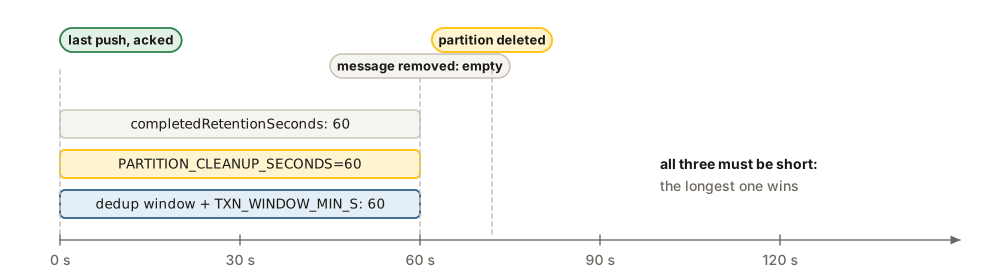
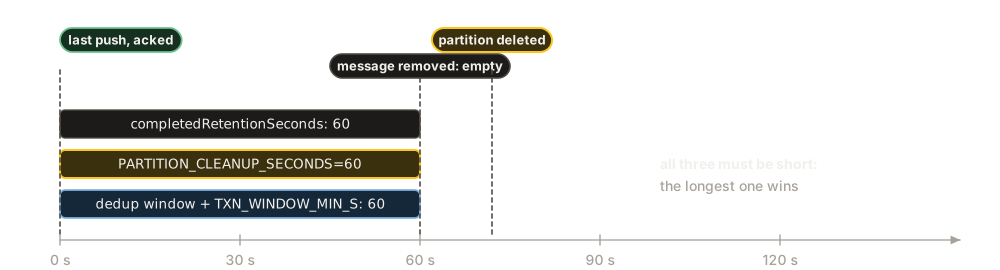
QUEEN_RAFT_TXN_WINDOW_MIN_S (15 minutes by default): a short cleanup needs both to be short too.On 2.6.0 the third setting matters when partitions come and go fast: we saw the problem from 200 new partitions a second. By default the retention scan paces each round from the size of the previous one. When new partitions arrive faster than that, a round never ends, and nothing is deleted: in a test with 1,000 new partitions a second, 594,000 of 595,000 partitions were still there after ten minutes. 40000 turns that pacing off. With it, 1,000 and 2,000 new partitions a second stayed flat, at about 70,000 and 150,000 partitions.
Kafka clients
QUEEN_KAFKA_EMBEDDED=true opens a Kafka port (9092) on every node, so existing Kafka producers and consumers work without code changes. On a cluster, each node also needs QUEEN_KAFKA_ADVERTISED_ADDR, the address at which clients reach that node’s Kafka port. The Kafka port has no TLS in 2.6, and passwords (QUEEN_KAFKA_SASL=plain) cross the network in clear: keep it on a private network. Kafka clients has the details.
Thousands of queues
By default each queue has its own log file on disk, and a write can touch many files. QUEEN_QLOG_SHARDS=K puts all queues into K shared logs instead, so a write syncs at most K files. It is read only when the data directory is created, so set it before the first start.
To survive the loss of a whole site
Three nodes in one zone, or in one Kubernetes cluster, all go down together when that goes. A standby is a second cluster, somewhere else, that reads everything the first one commits and stays a moment behind it. When the first is lost, you promote the standby and point the clients at it.