Three nodes protect you from losing a machine, not from a mistake: a deleted queue or a retention that was too short reaches every node as faithfully as a good write. A backup is the copy that lives outside the cluster. Recovery says it in short; this page has every command.
What a backup holds
The data directory (QUEEN_RAFT_DIR) is a node’s whole state: the messages (qlog/), the store with queues, partitions, positions, KV, timers and dedup records (store/), the raft state, and with the proxy its tenants and keys. Every node holds the same data, so one copy of one node can come back as any node.
Two things are not in it: ephemeral queues, which live in memory, and the settings (QUEEN_RAFT_TOKEN, the JWT and proxy secrets, QUEEN_ENCRYPTION_KEY). Keep the encryption key apart, with the same care: without it the payloads of encrypted queues cannot be read, and a node started with another key hands out the ciphertext without an error.
Take one
| Method | While the node runs |
|---|---|
A snapshot of the volume: a cloud disk snapshot, a CSI VolumeSnapshot, LVM, ZFS or btrfs. The whole directory must be on that one volume. |
Yes |
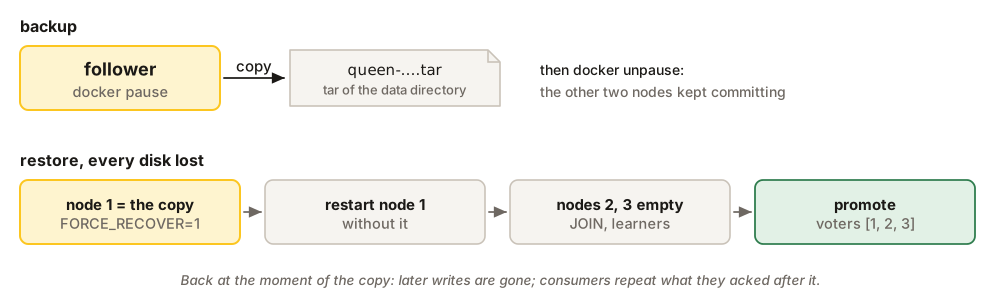
Freeze, copy, thaw: SIGSTOP or docker pause, then tar, then SIGCONT or docker unpause. On a cluster, freeze a follower; freezing the leader costs an election. |
Yes, paused for the copy |
| Stop the node, copy, start it. | No |
cp, tar or rsync of a running node, without freezing it. |
Never: the files are copied at different moments |
# Freeze, copy, thaw.
PID=$(pgrep -x queen)
kill -STOP "$PID"
tar -C /var/lib/queen -cf "/backup/queen-$(date -u +%Y%m%dT%H%MZ).tar" raft
kill -CONT "$PID"          # thaw whether or not the copy worked
# Freeze the container, copy its volume through a helper container, thaw.
docker pause queen
docker run --rm --entrypoint tar -v queen-data:/data:ro -v /backup:/backup \
ghcr.io/queen-mq/queen:2.6.0 -C /data -cf "/backup/queen-$(date -u +%Y%m%dT%H%MZ).tar" .
docker unpause queen# A snapshot of one pod's volume. Needs a CSI driver with snapshot support.
apiVersion: snapshot.storage.k8s.io/v1
kind: VolumeSnapshot
metadata: { name: queen-20261002, namespace: queen }
spec:
volumeSnapshotClassName: <your snapshot class>
source: { persistentVolumeClaimName: data-queen-1 }A follower can be a few entries behind the leader, so a write acknowledged in the instant before the copy may be missing from it. Take copies on a schedule that matches what you can afford to lose, keep several, and restore one now and then on a spare machine.
Restore one node
The node goes back to the moment of the copy. Stop it, put the copy in place of its data directory, start it:
systemctl stop queen                      # or docker stop; the node must be down
mv /var/lib/queen/raft /var/lib/queen/raft.old
tar -C /var/lib/queen -xf /backup/queen-20261002T1200Z.tar
systemctl start queen
Keep the files owned by the user the node runs as.
Restore a cluster
When every disk is gone, one copy becomes node 1’s directory, node 1 starts alone with QUEEN_RAFT_FORCE_RECOVER=1, and the other nodes join it empty. The forced recovery is needed because the copy still lists three voters, and node 1 alone is not a majority of them.
# Every node stopped, every data directory gone or moved away.
# 1. On queen-1, unpack the copy (taken on any node) as its data directory.
tar -C /var/lib/queen -xf /backup/queen-20261002T1200Z.tar
# 2. Start queen-1 alone with QUEEN_RAFT_FORCE_RECOVER=1. Once the probe commits through it,
#    restart it without the variable.
# 3. Start queen-2 and queen-3 on empty directories with QUEEN_RAFT_JOIN=true, then:
curl -s -X POST http://queen-1:6632/api/v1/system/raft/membership/learners \
  -H 'content-type: application/json' -d '{"id":2,"raft":"queen-2:7400","http":"queen-2:6632"}'
curl -s -X POST http://queen-1:6632/api/v1/system/raft/membership/learners \
  -H 'content-type: application/json' -d '{"id":3,"raft":"queen-3:7400","http":"queen-3:6632"}'
curl -s -X POST http://queen-1:6632/api/v1/system/raft/membership/promote \
-H 'content-type: application/json' -d '{"ids":[2,3]}'q() { kubectl -n queen exec "$1" -c queen -- curl -s -m 30 "${@:3}" "localhost:6632$2"; echo; }
kubectl -n queen scale sts queen --replicas=0
kubectl -n queen wait --for=delete pod -l app=queen --timeout=300s
kubectl -n queen delete pvc data-queen-0 data-queen-1 data-queen-2
# 1. Pod 0's volume, created from the snapshot (taken on any pod).
kubectl -n queen apply -f - <<'EOF'
apiVersion: v1
kind: PersistentVolumeClaim
metadata: { name: data-queen-0 }
spec:
accessModes: [ReadWriteOnce]
storageClassName: <your storage class>
resources: { requests: { storage: 50Gi } }
dataSource: { apiGroup: snapshot.storage.k8s.io, kind: VolumeSnapshot, name: queen-20261002 }
EOF
# 2. Pod 0 alone, force-recovered, then restarted without the variable.
kubectl -n queen set env sts/queen QUEEN_RAFT_FORCE_RECOVER=1
kubectl -n queen scale sts queen --replicas=1
kubectl -n queen rollout status sts/queen
kubectl -n queen set env sts/queen QUEEN_RAFT_FORCE_RECOVER-
kubectl -n queen rollout status sts/queen
# 3. The other two, empty. Add them once both pods are Running, then promote them.
kubectl -n queen scale sts queen --replicas=3
for i in 1 2; do
P=queen-$i.queen-headless.queen.svc.cluster.local
q queen-0 /api/v1/system/raft/membership/learners -X POST -H 'content-type: application/json' \
-d "{\"id\":$((i + 1)),\"raft\":\"$P:7400\",\"http\":\"$P:6632\"}"
done
q queen-0 /api/v1/system/raft/membership/promote -X POST -H 'content-type: application/json' -d '{"ids":[2,3]}'If the copy comes from a node that once ran a forced recovery, node 1 refuses to start: move raft/force_recovered.json out of the restored directory first.
Limits
- There is no backup command and no log shipped between copies: a restore always goes back to a copy.
- A copy restores a single node or a whole cluster, never one node of a running cluster: a node whose log went backwards is not repaired by the others. To rebuild one node, let it copy from its peers (replace a node).
- To lose a moment instead of everything since the last copy, run a standby cluster too. Keep the backups anyway: a standby replays a mistake as faithfully as the cluster made it.