QueenMQ is a distributed message broker, built in Rust, replicated with Raft, and developed at Smartness. With it you can write applications that decouple producing from consuming, do request and reply, and process streams, using transactional features that let you remove a lot of logic from the application and offload it to QueenMQ.
Every feature the broker has is there because we needed it at Smartness, where it powers almost every product.
In one picture
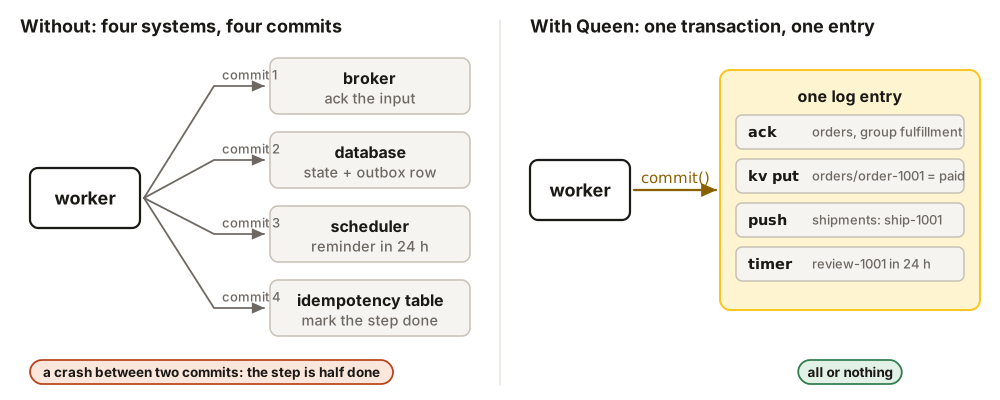
A worker takes a message, does its job, and then does several things at once: it finishes the message, saves some state, pushes the next events and asks for a reminder later. In most stacks those are four systems and four commits. In QueenMQ they are one call, written as one entry of the log, all or nothing.
How these docs are organized
These pages follow the little book of QueenMQ (a free PDF), chapter by chapter, with every example in the six languages of the SDKs.
| Section | What it covers |
|---|---|
| Introduction | Why we built QueenMQ (the story that went from a Postgres table to a log on disk replicated with Raft), and the model in four ideas: partitions, leases, transactions and a simple interface. |
| Writing applications | Every feature of the client API, one page each: a local broker, queues and their options, push, pop and consume, acks, retries and the dead-letter queue, transactions, KV, locks and timers, ephemeral queues and stream processing. |
| Patterns | The common messaging patterns, one page each, with a real case: work queue, publish/subscribe, request and reply, ordering and batching, workflows, windowed aggregation, rate limiting, last value, delayed messages, retries and dead letters, one worker at a time. |
| Integrations | Kafka clients through the built-in Kafka port, an S3 bucket kept up to date by the sink, PostgreSQL tables read and written by the source and the sink, and the Laravel queue driver. |
| Manage clusters | The settings that matter most, a cluster with Docker and inside Kubernetes, the configuration for different needs, upgrades and monitoring, and what to do when something breaks. |
| Architecture | How the broker works inside: one leader per tenant, the path of a write from the request to the disk, Raft, the memory state, the consumption engine, LMDB, and the files on disk down to their bytes. |
| Reference and Benchmarks | The HTTP API, every setting, metric, error and limit, and the measurements with their conditions. |
Every piece of code on these pages comes from a program that runs it against QueenMQ 2.6.0 and checks the result. Pick your language in any code block, and every block follows.
Try it
The fastest way in is the five-minute guide on the homepage. Then start a broker and write your first application in Writing applications.