Queen MQ · Apache 2.0
High-performance transactional messaging on PostgreSQL, with an ordered stream per entity.
You can offload most of your complex application logic to Queen.
Queen is a message broker written in Rust that keeps every byte of its state in PostgreSQL. Its defining abstraction is one logical ordered partition per application entity, a customer, an account, a conversation, a device, a workflow, a session or a job, created by the first push that names it and never provisioned in advance.
Consumer groups · Replay and seek · Dead-letter queue · Exact deduplication · Transactional ack + state + push · Key/value state · Cancellable timers · Windowed aggregation · Ephemeral queues · Multi-tenancy · Kafka wire protocol · SQS and SNS wire protocols
The problem
Most brokers give you ordering per shard. Your requirement is ordering per entity: this customer's events processed in order, this conversation's messages not overtaking each other, this account's transactions settling in sequence.
Bridging the two is where the pain lives. Hash your entities onto a fixed partition count and the ones that collide block each other: a slow customer stalls every customer sharing its shard. Give each entity its own queue instead and broker-side objects grow with your customer list.
Queen removes the bridge: the entity is the partition.
One entity, one ordered partition
Each partition is an independent ordered lane, created by the push that first names it. Nothing is preallocated, nothing is assigned, nothing rebalances when a consumer restarts.
customer A  ──►  A1 ──► A2 ──► A3     strict FIFO within a lane
customer B  ──►  B1 ──► B2            B is not held up by A
customer C  ──►  C1 ──► C2 ──► C3     C is not held up by A or B
A single hot partition stays sequential, by design. Parallelism comes from many active partitions, not from splitting one. The model, in one page →
Transactional processing
The second reason Queen exists, and the reason PostgreSQL is not an implementation detail. A single call bundles acknowledgements, pushes, key/value writes and timer operations into one PostgreSQL transaction.
consume input
     │
     ├── update application state   (kv rider)
     ├── produce output             (push, any queue, any partition)
     ├── schedule / cancel a timer  (timers rider)
     └── acknowledge input          (cursor advance)
                │
             COMMIT          all of it, or none of it
Atomicity covers broker state, not the network. Queen does not make an external HTTP call exactly-once, and no broker can. The one case that is exactly-once end to end is when the effect is itself a row in this PostgreSQL, written through the key/value rider: marker, effect, output and cursor advance become a single commit. The bundle shape and every rollback cause →
Each frontier is where a system stops keeping one ordered lane per entity: measured on matched hardware for Kafka, RabbitMQ and pgmq, taken from the published quotas for SQS, and dashed wherever the edge is one we did not measure. Queen's region is a square because the axes share a scale and it reaches a million on both, in two separate runs. The conditions behind every figure are in the comparison and in the measured runs.
It looks like this
Queues and partitions are created on first use, so there is nothing to provision before the first line runs.
const res = await client
  .queue('orders')
  .partition('customer-42')
.push([{ data: { orderId: 9137, amount: 99.5 } }])await client
.queue('orders')
.group('billing')
.subscriptionMode('all')
.limit(1)
.each()
.consume(async (message) => {
console.log(message.data)
})There are SDKs for JavaScript, Python, Go, Rust, PHP and C++, an operator CLI, and a plain HTTP API for everything else.
What makes it different
The entity is the partition
Most brokers give you ordering per shard, and your requirement is ordering per entity. Hash entities onto a fixed partition count and the ones that collide block each other. Give each entity its own queue and broker-side objects grow with your customer list. Queen removes the bridge: a partition is created by the first push that names it, and a slow customer delays only itself.
The partition key is your ordering boundary
customer_id, account_id, conversation_id, device_id, workflow_id. You choose it, and it is an application decision rather than an infrastructure sizing decision. Do not pick a key because it has high cardinality: pick the boundary your application genuinely requires.
Ack the input, write the state and push the output in one commit
One transaction bundles acknowledgements, pushes, key/value writes and timer operations, across any number of partitions, queues and consumer groups. That is what replaces transactional outbox tables, a separate store for idempotency markers, and the reconciliation code that exists only because the broker's commit and the database's commit were two different commits.
Application scale is not infrastructure scale
In most brokers a per-entity ordering guarantee means a per-entity infrastructure object, either a topic partition with its own files and replicas or a live server-side queue. In Queen a partition is a row. A million of them measured 315 MB in total, and the serve path does not care how many exist.
Partitions, brokers and cells scale different things
Partitions scale application cardinality. Brokers scale serving capacity and availability inside a cell, with three replicas the designed ceiling. Cells scale the deployment: capacity grows by adding cells, not by growing one system, and there is no global cluster to join and no cross-cell coordination in the message path.
PostgreSQL is the durable source of truth
Not somewhere to put the bytes. Messaging state and application state share a transaction, which is the whole reason for the design, and durability, replication, backup and SQL introspection are the ones you already operate. The trade is plain: the database is the throughput ceiling and the single failure domain.
Brokers hold nothing authoritative
Messages, offsets, leases, deduplication state, queue configuration and dead letters are all rows, so a broker can be added, removed, restarted or rolled without a rebalance, and deduplication stays exact across replicas with no coordination protocol at all.
Key/value state, timers and windows are part of the engine
A key/value write can share the transaction with a push and an ack, which a store standing beside the broker cannot do at any price. A timer is a scheduled message you can cancel and reprogram until it fires. Tumbling, sliding, session and cron windows commit their state, their output and their acks together. None of it is a flag you turn on.
Many tenants on one cell, isolation enforced in SQL
The broker scopes queue identity natively as (tenant, name), so two tenants both owning a queue called orders own different queues. The proxy is the tenant-facing boundary that makes the identity driving that scoping trustworthy. Neither half is sufficient alone.
Plain HTTP, six SDKs, one binary
No custom wire protocol, no JVM, no Erlang, no ZooKeeper. Anything that can make an HTTP request is a first-class client, and curl is one.
Kafka clients reach it by changing one line
queen-kafka is a facade that ships in the same image as the broker and stays off until you switch it on. It advertises 32 Kafka API keys, transactions included, so an unmodified producer or consumer moves across by changing bootstrap.servers and nothing else. It holds no database connection and stores nothing durable: it is a Queen client like any SDK is, and what it deliberately does not do is written down.
So do SQS and SNS clients
queen-sqs answers both Amazon wire protocols out of that same image, so an unmodified AWS SDK moves across by changing endpoint_url. Nothing durable lives in the process, so any instance answers any request and an ordinary load balancer in front is the supported shape rather than a hazard.
Three kinds of scale
Three axes, frequently confused, not interchangeable. Confusing them is the most common way to mis-size a deployment.
Partitions scale application cardinality
Add entities freely. Nothing is provisioned, no process is created, no rebalance runs. Millions of logical entity streams do not require millions of infrastructure objects.
Brokers scale capacity inside a cell
Stateless replicas of one binary against one PostgreSQL, covering a process dying, a rolling restart, one node's network. Three replicas is the designed ceiling: past that the bottleneck is the database, not the broker count.
Cells scale the deployment
A cell is PostgreSQL plus one or more stateless brokers, optionally fronted by the proxy. Capacity grows by adding cells, not by growing one system: no global cluster to join, no cross-cell coordination in the message path.
                    Queen Cell
     ┌────────────────────────────────────┐
     │  Queen Broker ──┐                  │
     │  Queen Broker ──┼──► PostgreSQL    │  the only durable state
     │  Queen Broker ──┘                  │
     │  Queen Proxy  (optional)           │  tenant-facing boundary
     └────────────────────────────────────┘
A cell is at once the scaling boundary, the failure boundary and the unit of upgrade and operational ownership. The failure domain is PostgreSQL: Queen does not replicate itself, and keeping the database alive is PostgreSQL's own tooling. Replicas, the mesh, and surviving a database outage →
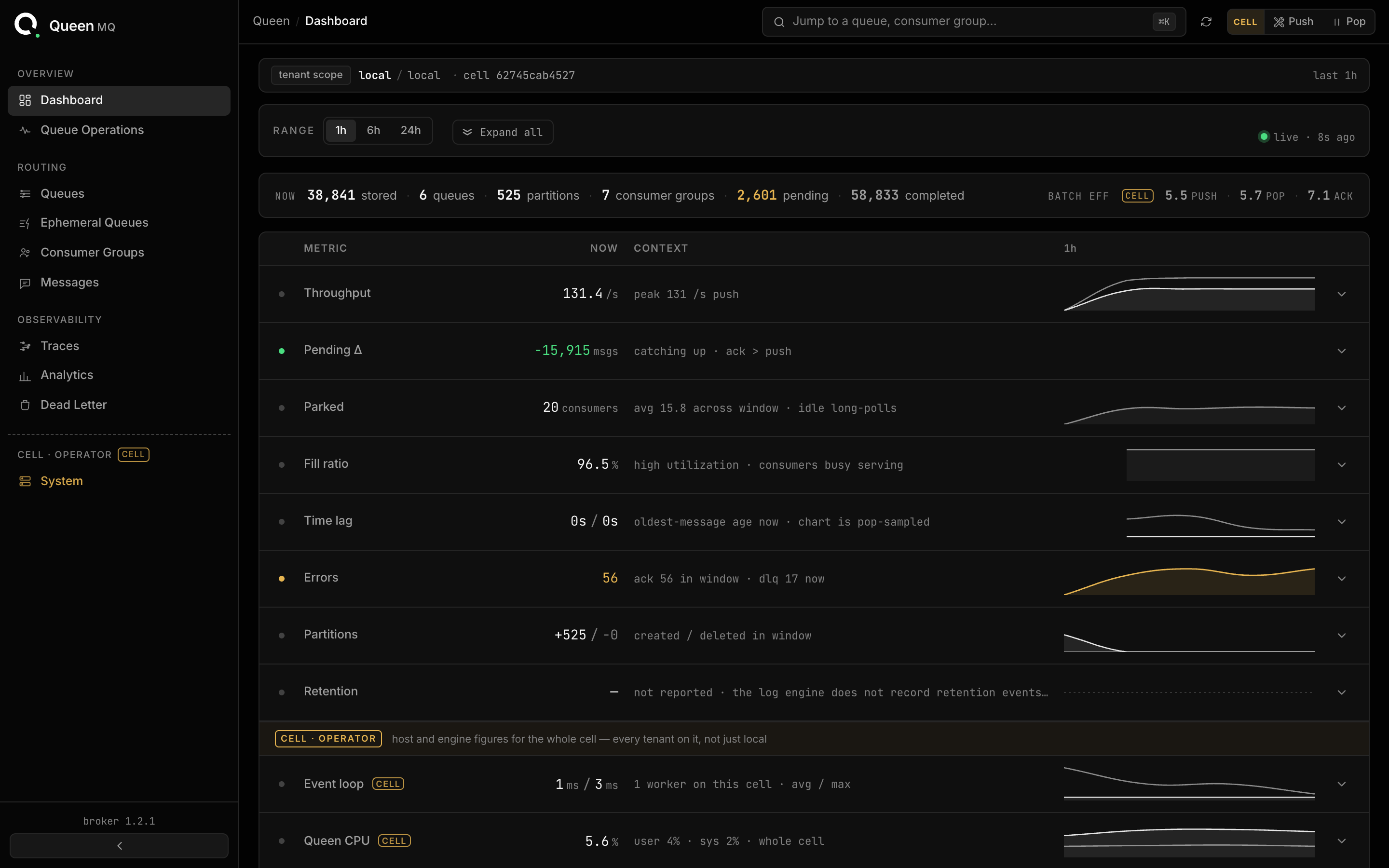
The dashboard is already in there
Queue health, per-group lag, message inspection and dead-letter replay. Nothing was installed to get this: it is the same binary, on the port you already opened, and it grows logins and roles when it runs behind the proxy.
Measured, with the conditions attached
Every number on this site names the run that produced it. A figure without an archived artifact recording its configuration does not get published here. These are single-shape runs: they say nothing about your throughput, latency, PostgreSQL sizing or retention capacity, which follow from your workload, payloads and hardware.
About 1,000,000 a second in each direction, pushed, popped and acknowledged, with explicit acks and deduplication on. Zero restarts, and broker memory flat near 4.1 GB for the whole run.
A million FIFO lanes in one PostgreSQL, none preallocated, created during the run at a thousand a second while serving 200,000 messages a second. Zero push, pop or ack errors over 722 million messages.
1,000 partitions through a four-stage pipeline at 25,000 events a second: 88,503,408 messages verified by a per-stage checker, with zero duplicates and zero gaps.
Twelve tenants sharing one queue name and one consumer group name for an hour, with enforcement on. Not one message crossed a tenant boundary. Isolation is the clean result of that run, not throughput.
Queen has real limits, and some workloads are better served elsewhere. One ordered lane is sequential, so if your ordering boundary is everything, the core idea does nothing for you. In-group parallelism is bounded by how many distinct entities you push to. One PostgreSQL is both the throughput ceiling and the failure domain, there is no tiered object storage and no cross-region replication, and the Kafka facade speaks the wire protocol but not the ecosystem around it, so log compaction, Kafka Streams, Connect's exactly-once source and the Schema Registry's compacted topic all stay out. Read the full list before you design around it →