
The shape of Queen.
Queen has six concepts. Once you have them in your head you can predict what every API call will do without looking it up.
Queues
A queue is a logical container of messages. Each queue has its own configuration:
- leaseTime, seconds before a popped message is re-queued if not acked.
- retryLimit, failed attempts before the message goes to the DLQ.
- retentionSeconds / completedRetentionSeconds, how long pending and completed messages are kept.
- encryptionEnabled, at-rest AES-256-GCM encryption of payloads.
- priority, higher-priority queues are drained first by multi-queue consumers.
- delayedProcessing, windowBuffer, maxSize, dlqAfterMaxRetries, fine-grained controls.
Queues are created on first push by default. Call configure first if you
want non-default settings:
Optionally, queues can also belong to a namespace and a task. These
are tags that let consumers pop from many queues at once
(?namespace=billing&task=process-invoice) without naming them
individually.
Partitions
A partition is an ordered lane inside a queue. Messages pushed to the same partition are guaranteed to be processed in order; messages on different partitions can be processed in parallel.
Unlike Kafka, partitions in Queen are not physical commit-logs. They're logical, there is no quota, no rebalance, no broker pinning. Make one per user, tenant, chat, video, or device. Tens of thousands per queue is normal.
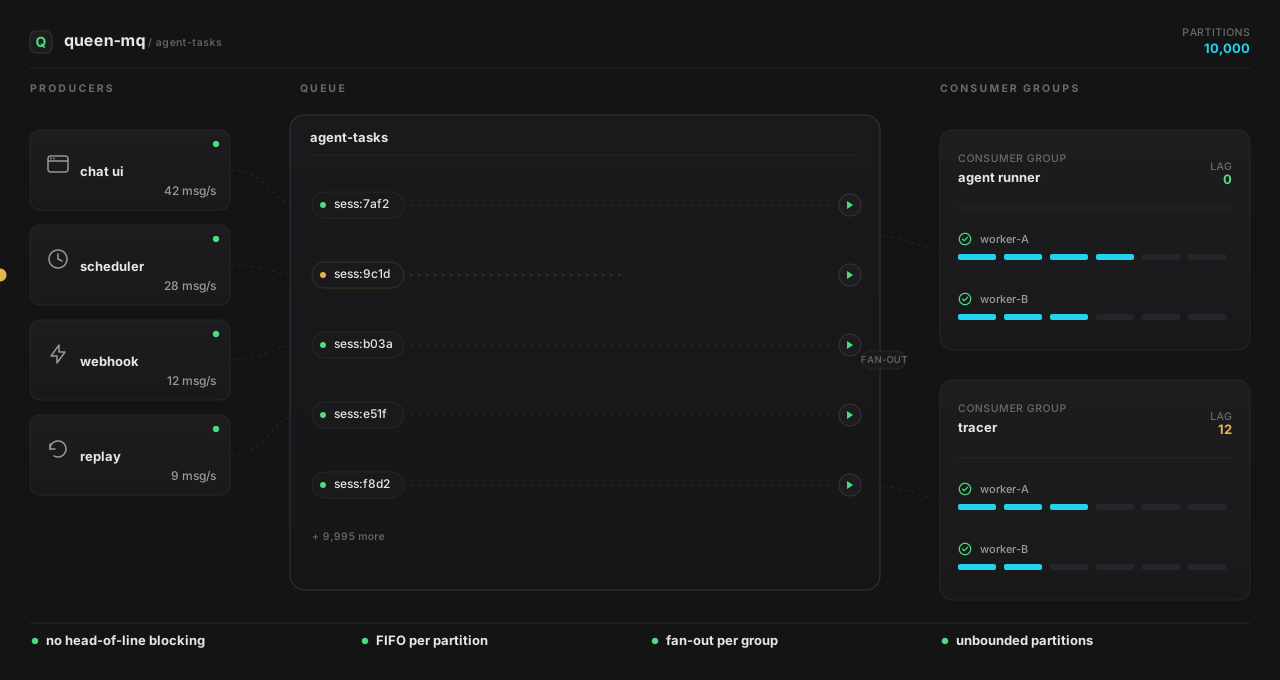
agent-tasks; each session is its own FIFO partition;
agent runner and tracer each consume the same stream with
their own offset. A 28-second tool call on sess:9c1d never touches the
other 9,999 sessions.
No head-of-line blocking
If user A's message takes 30 seconds to process, user B's message on a different partition is unaffected. The lane is the unit of ordering, not the bottleneck.
You can ignore partitions
Pushing without a partition uses the special Default partition. Plenty of workloads (broadcast events, fire-and-forget jobs) don't need ordering at all.
Consumer groups
A consumer group is a named offset over a queue. The semantics:
- Same group, multiple workers, workers share messages (load balancing).
- Different groups, each group sees every message independently (fan-out).
- No group, falls back to "queue mode": a single shared offset called
__QUEUE_MODE__.
Subscription modes
When a brand-new consumer group connects, it can choose where to start:
| Mode | Behavior |
|---|---|
(default, all) |
Process every message ever pushed, including the entire backlog. |
new |
Skip everything older than the moment the group joins; only process messages pushed after. |
subscriptionFrom: '2025-12-01T00:00:00Z' |
Replay from a specific timestamp. |
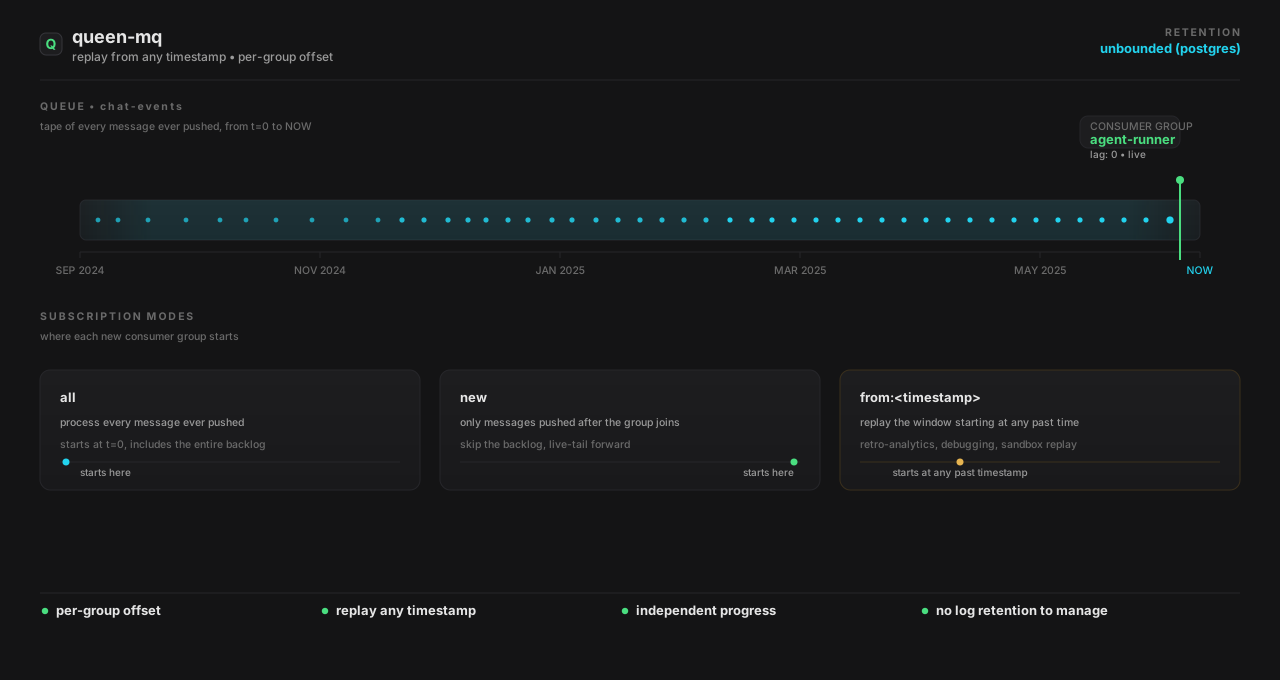
agent-runner group keeps consuming at the head while a new
report-fall-2024 group materialises at subscriptionFrom: 2024-09-01
and replays the historical window. PostgreSQL is the source of truth, there is no separate
log retention to manage.
Leases & retries
A popped message is leased to one consumer for leaseTime seconds.
If the consumer doesn't ack within that window the lease expires and the message is
re-queued. If the consumer acks with failed, the message goes back to the
queue (or the DLQ if it has exceeded retryLimit).
For tasks that may exceed leaseTime (LLM calls, video transcodes), have
the client renew the lease in the background:
await queen.queue('jobs')
  .renewLease(true, 2000)   // renew every 2s
  .autoAck(false)
  .each()
  .consume(async (m) => { /* long work */ })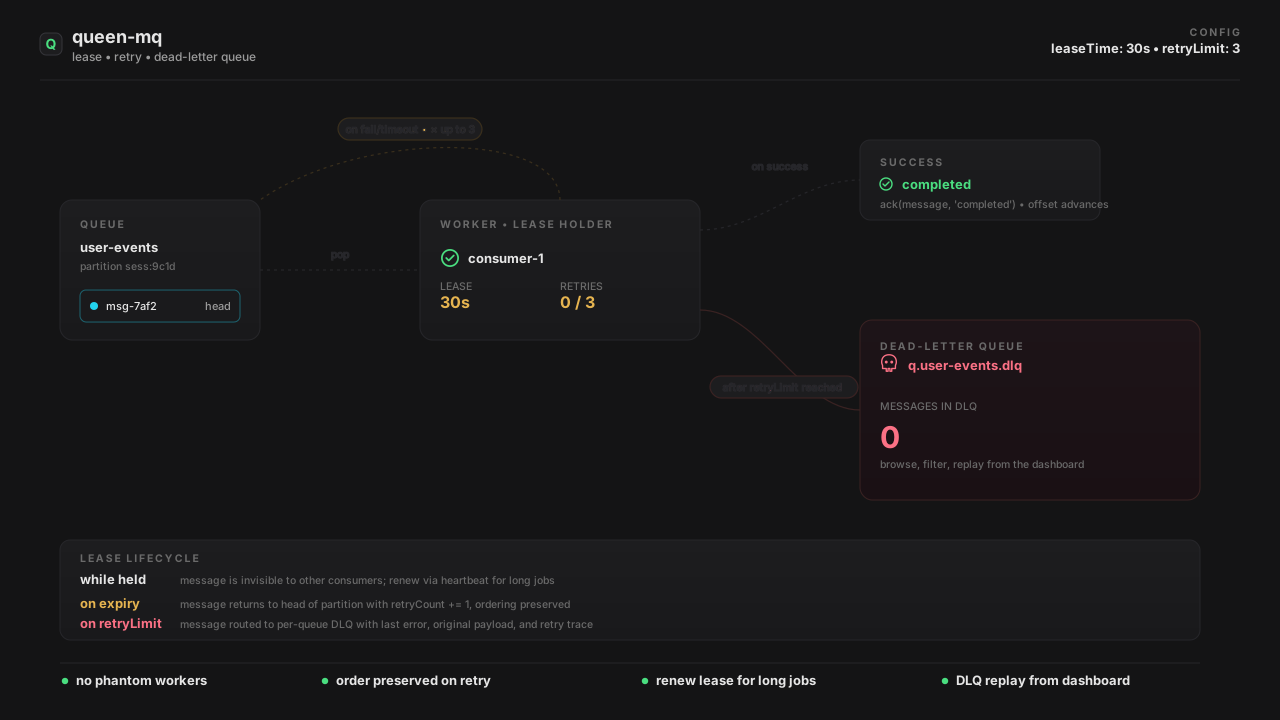
retryLimit the message is
moved with the last error and the original payload, available to browse and replay
from the dashboard.
Transactions
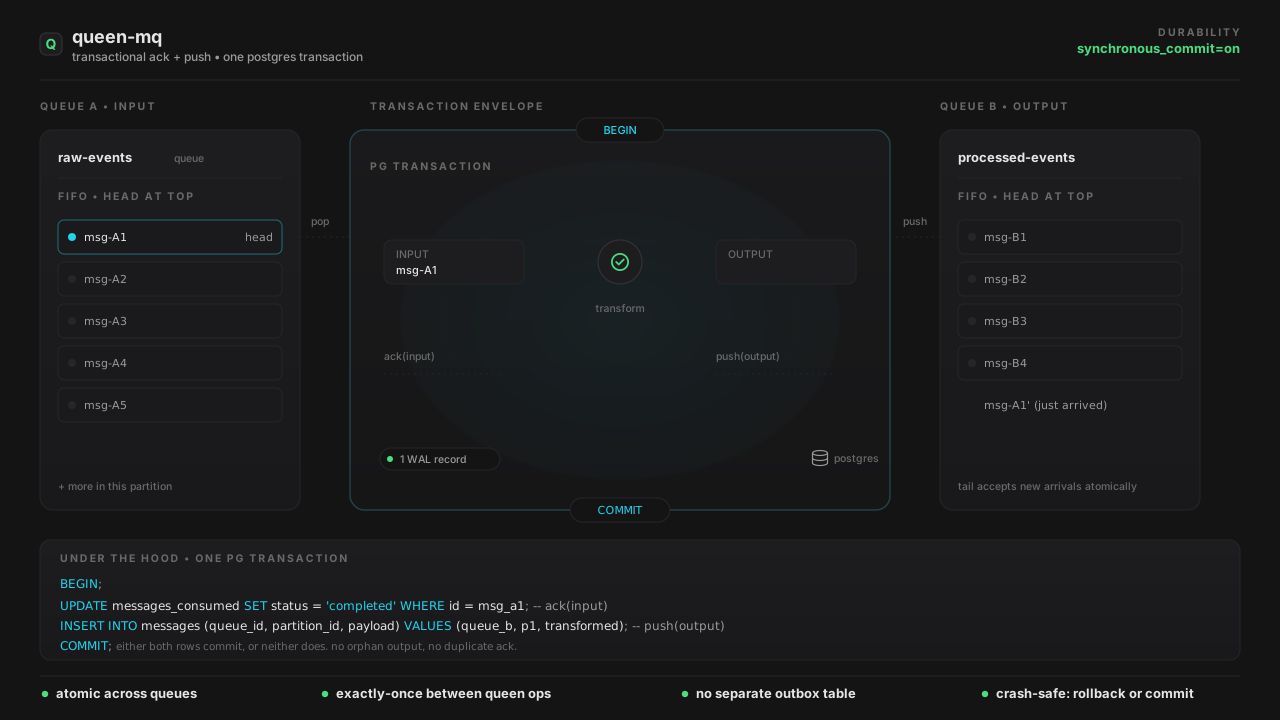
A transaction is an atomic bundle of ack + push operations. Either the whole bundle commits, or none of it does. This is what makes multi-stage pipelines exactly-once.
Under the hood this is a single BEGIN…COMMIT against PostgreSQL. The
ack and the insert are in the same WAL record, there's no in-between state where
the input is acked but the output never landed.
Long polling
Pop with wait=true and the server holds the connection open until a
message arrives, the timeout expires, or you cancel the request. No busy-loop polling
on the client.
In a multi-instance cluster, pushes broadcast a UDP "wake-up" packet to peer servers so a long-poll on instance B can return immediately when instance A pushes, no database polling involved.
Dead-letter queue
Each queue can opt into a DLQ. When a message exceeds retryLimit (or the
per-queue maxWaitTimeSeconds) Queen moves it to the DLQ along with the
last error message, retry count, and original timestamps. You can browse, filter, and
replay DLQ messages from the dashboard or the HTTP API.
Disk failover
If PostgreSQL becomes unreachable, pushes do not fail. The server writes them to a
local file buffer (FILE_BUFFER_DIR) and acknowledges to the client.
When PostgreSQL recovers, a background scanner streams the buffered events back into
the database in order. Result: zero message loss even through
failovers, restarts, and short network partitions.
The disk buffer covers the push path. Pop and ack require the database to be live. For full HA, run the server behind multiple replicas and configure PostgreSQL with a streaming replica + automatic failover.
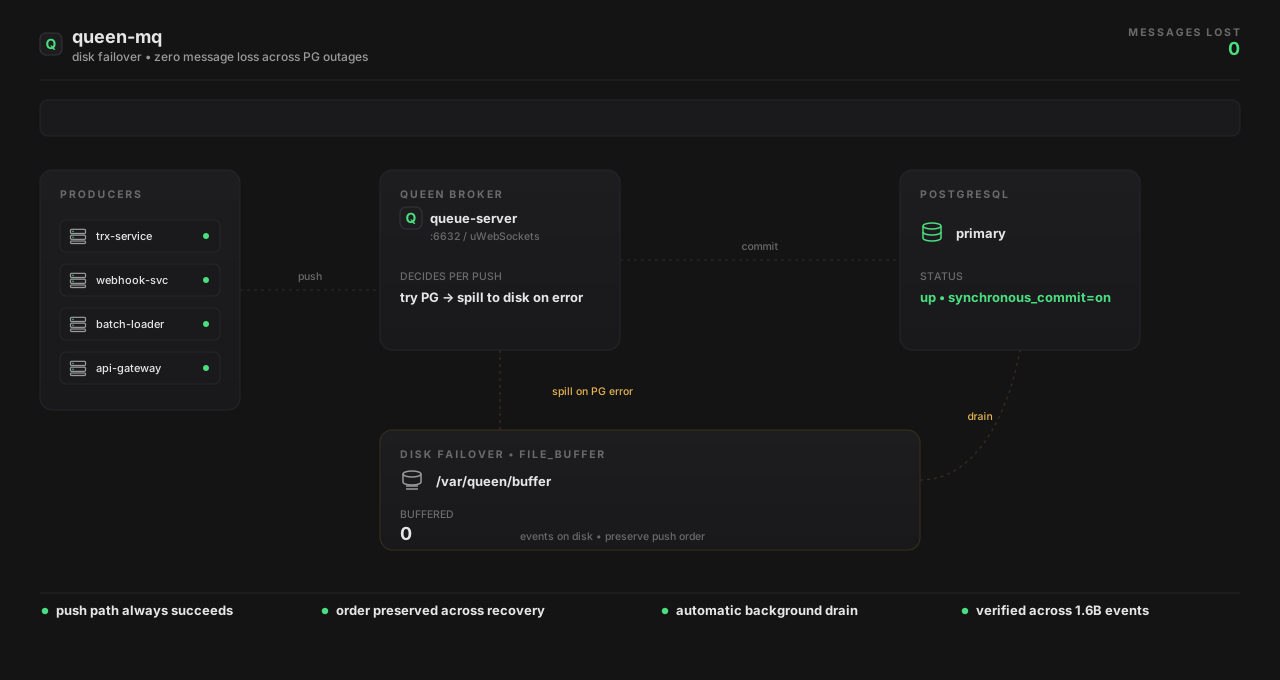
FILE_BUFFER on local disk and
clients still get an HTTP 201. When PG recovers, a background scanner drains the
buffer back in order. Verified across 10.4B+ messages with zero loss.
Tracing
Every message can carry a traceId. Push the same trace ID across multiple
queue stages and Queen stitches them together into a timeline you can visualize in the
dashboard. Useful for debugging multi-stage pipelines (translate → agent → notify),
showing per-stage latencies, error correlations, and consumer-group ownership.