Many workers share one stream of jobs, and each job is done by exactly one of them: resizing photos, sending emails, rendering invoices. This is the work queue, also called competing consumers.
In Queen it is a consumer with no consumer group. Each message goes to one worker. Work runs in parallel across partitions: a partition is held by one worker at a time, so here every user’s photos are a partition, and three workers share four users.
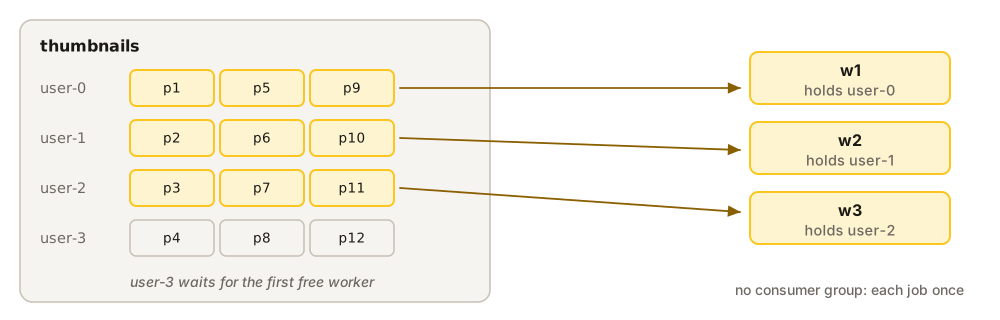
// Twelve photos to resize, from four users.
for (let i = 1; i <= 12; i++) {
  await queen.queue('thumbnails').partition(`user-${i % 4}`)
    .push([{ data: { photo: `p${i}.jpg` } }])
}

// Three workers compete for the jobs: each job goes to exactly one of them.
const worker = (name) => queen.queue('thumbnails')
  .partitions(1)                                  // one user's photos at a time
  .each()
  .idleMillis(1500)                               // stop when there is nothing left
  .consume(async (job) => resize(job.data.photo, name))

await Promise.all([worker('w1'), worker('w2'), worker('w3')])
# Twelve photos to resize, from four users.
for i in range(1, 13):
await queen.queue("thumbnails").partition(f"user-{i % 4}").push(
[{"data": {"photo": f"p{i}.jpg"}}]
)
# Three workers compete for the jobs: each job goes to exactly one of them.
def worker(name):
async def handle(job):
await resize(job["data"]["photo"], name)
return (
queen.queue("thumbnails")
.partitions(1) # one user's photos at a time
.each()
.idle_millis(1500) # stop when there is nothing left
.consume(handle)
)
await asyncio.gather(worker("w1"), worker("w2"), worker("w3"))// Twelve photos to resize, from four users.
for i := 1; i <= 12; i++ {
_, err := client.Queue("thumbnails").Partition(fmt.Sprintf("user-%d", i%4)).
Push(map[string]interface{}{"photo": fmt.Sprintf("p%d.jpg", i)}).
Execute(ctx)
if err != nil {
log.Fatal(err)
}
}
// Three workers compete for the jobs: each job goes to exactly one of them.
worker := func(name string) error {
return client.Queue("thumbnails").
Partitions(1). // one user's photos at a time
Each().
IdleMillis(1500). // stop when there is nothing left
Consume(ctx, func(ctx context.Context, job *queen.Message) error {
return resize(job.Data["photo"].(string), name)
}).
Execute(ctx)
}
var workers sync.WaitGroup
for _, name := range []string{"w1", "w2", "w3"} {
workers.Add(1)
go func() {
defer workers.Done()
if err := worker(name); err != nil {
log.Fatal(err)
}
}()
}
workers.Wait()// Twelve photos to resize, from four users.
for i in 1..=12 {
queen
.queue("thumbnails")
.partition(format!("user-{}", i % 4))
.push(json!({ "photo": format!("p{i}.jpg") }))
.await?;
}
// Three workers compete for the jobs: each job goes to exactly one of them.
let worker = |name: &'static str| {
let jobs = queen
.queue("thumbnails")
.partitions(1) // one user's photos at a time
.idle(Duration::from_millis(1500)); // stop when there is nothing left
async move {
jobs.consume(move |job: Message| async move {
resize(job.data["photo"].as_str().unwrap_or_default(), name).await;
Ok::<_, queen_mq::Error>(())
})
.await
}
};
tokio::try_join!(worker("w1"), worker("w2"), worker("w3"))?;// Twelve photos to resize, from four users.
for ($i = 1; $i <= 12; $i++) {
$queen->queue('thumbnails')->partition('user-' . ($i % 4))
->push([['data' => ['photo' => "p{$i}.jpg"]]])
->execute();
}
// Three workers compete for the jobs: each job goes to exactly one of them.
$worker = fn (string $name) => $queen->queue('thumbnails')
->partitions(1) // one user's photos at a time
->each()
->idleMillis(1500) // stop when there is nothing left
->consume(fn (array $job) => resize($job['data']['photo'], $name))
->execute();
$pids = [];
foreach (['w1', 'w2', 'w3'] as $name) { // PHP has no threads: three processes
if (($pid = pcntl_fork()) === 0) {
$worker($name);
exit(0);
}
$pids[] = $pid;
}
foreach ($pids as $pid) {
pcntl_waitpid($pid, $status); // wait until all three have stopped
}// Twelve photos to resize, from four users.
for (int i = 1; i <= 12; i++) {
client.queue("thumbnails").partition("user-" + std::to_string(i % 4))
.push({{{"data", {{"photo", "p" + std::to_string(i) + ".jpg"}}}}});
}
// Three workers compete for the jobs: each job goes to exactly one of them.
auto worker = [&](const std::string& name) {
client.queue("thumbnails")
.partitions(1) // one user's photos at a time
.each()
.idle_millis(1500) // stop when there is nothing left
.wait(false) // short polls: the idle clock is read between them
.consume([&](const json& job) { resize(job["data"]["photo"], name); });
};
std::thread w1(worker, "w1"), w2(worker, "w2"), w3(worker, "w3");
w1.join(); w2.join(); w3.join();All twelve photos were resized once each, shared out between the three workers (6, 3 and 3 in one run).
Why
order still holds inside each user’s photos, and a slow user holds up only its own partition. To go faster, add workers, up to the number of partitions that have work.
One thing to know: with a single partition the workers would take turns, one at a time. Give the jobs a partition per user, per customer or per tenant.
Built from: Pop and consume, Push.